

Last week I wrote about defining accounting automation by applying a number to the impact automation has on an organization. This came from the idea that automation is only as good as the people, time and effort that is freed up. On Friday I wrote about the different types of time that needs to be evaluated, and the cliffhanger was helping you find what that time is by evaluating the cost of your organization.
This week’s series is dedicated to helping you find your cost and time. There are five steps. The first step is”Creating a Process Map“. (Note: if you are looking for examples of a process map, you can refer to my book the Argument to Automate – see the link below)
When I am working one on one with people or speaking to a live group, I make it clear that you need to spend time on creating a process map. I like to equate this first step to the base of a pyramid, where the pyramid can only be as high as the base is wide. The same thing with a process map; your number will only be as accurate as the map is thorough.
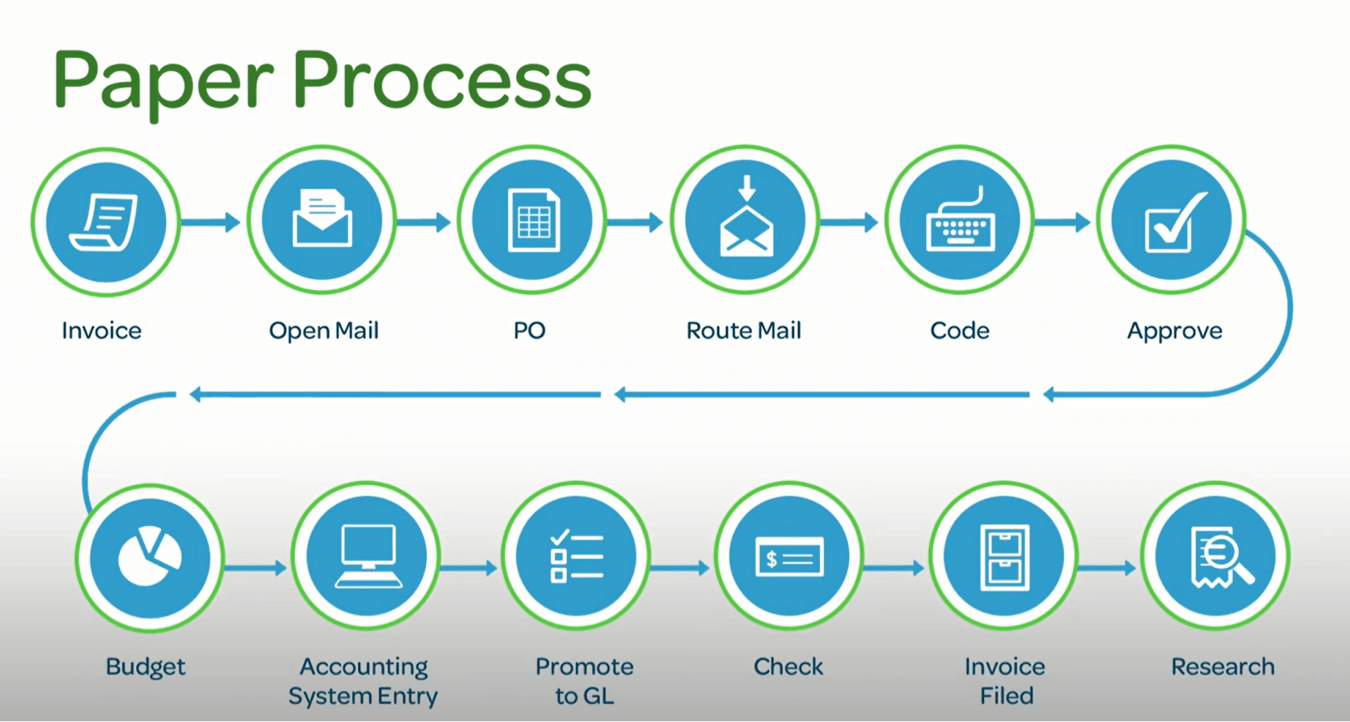
A process map is a detail step by step outline documeting the invoice process until it is entered into the account system for payment. The process map contiunes to document each step of the payment process until all information (invoice, payment and backup) is flied.
I recommend that you do the documenting on a department by department level. The reason for each department is to accommodate for individual checks and balances or nuances within that aspect of the business. A simple list on a word document or spreadsheet will work. You can get fancy by putting the process map into Visio, but be aware about putting too much time into the documentation, because the number at the end is the most important thing. Below I have given you an example of the process map in a picture. You are welcome to do this too. The picture works great when and if you have to “sell” your idea to a board or manager level.
Tomorrow we will take this is a step (literally) further by using the process map to notate people. Stay tuned!
For more information and examples buy the book – The Argument to Automate – How Innovation Can INSPIRE Not Fire – click here to buy
(Also) To get your copy of The 8 Pitfalls of Accounts Payable Automation – click here to buy




Leave a Reply to The 12 Days of Accounts Payable Automated Christmas | AP Automation NewsCancel reply